



Most people today recognize personal digital security as an essential aspect of their digital lives. Last week's Tidy Tuesday post explored backup habits and methods, and this week's discussion of security goes hand-in-hand with that. While backups provide a path to recovery in case of disaster, protecting your personal data through healthy security habits helps to avoid some of those disasters in the first place. Backups are your insurance, while security is the lock on your door.
Many people are at least vaguely aware of blatantly unsafe computing practices these days. For example, using (and re-using!) weak passwords, neglecting to install security updates, or even using public Wi-Fi without taking precautions can leave your data exposed, making you vulnerable to fraud, identity theft, and more. The habits we're about to discuss will probably sound somewhat familiar to you, and that's a good thing. Repetition helps drive the points home.
Digital security is an enormous and constantly evolving topic, and you could easily spend years learning the subject. Fortunately, you don't need a Ph.D. just to achieve significantly better-than-average data safety. You won't need to set up a dead man's switch to securely erase all of your data if you don't check in every week, or start using multiple layers of VPNs to access anything on the internet. (However, feel free to dig into these topics if they actually sound fun to you.) A few simple habits give you access to the "low-hanging fruit" of the security world, which is often enough to make you a much less attractive target than many other people.
Security and Data Organization
Before diving into the list of habits below, I want to point out one more thing. At first glance, it might not seem that digital security and data organization go together, but the opposite is true. The reason for this is simple: how can you properly protect your data if you don't know what you have or where it is?

Of course, most of us have many other reasons for pursuing digital organization. Security might not be at the top of the list. And of course, securing our data doesn't automatically organize it. But if you try to implement safe data habits without first (or at least simultaneously) working to identify and organize what you already have, you'll likely end up leaving a big chunk of it in a risky situation.
If you're not sure where to start among all of these recommendations, follow the Tidy Tuesday post order:
- First, get a handle on what you have and how you might filter and organize it.
- Then, make sure you have at least one good backup, preferably with a redundant copy.
- Finally, move on to building security-related habits to protect what's important to you.
As always, don't try to do everything at once. Choose one small task to work on first; complete it, celebrate, then move on to the next.
Essential Security Habits
The most important action is to make security more than an afterthought. Most of the individual decisions we make about our data don't have significant risks no matter what we choose, but we're not doing ourselves any favors by neglecting even to consider what might happen or identifying easy ways to avoid danger.
Below, you'll find simple and effective habits you can start practicing today. Cultivating these habits will significantly improve your protection without having to sacrifice too much convenience.
- #1: Limit access to your personal data.
Does that set of files need to go on Dropbox or only the archive on my external hard drive? Do those photos belong in a shared iCloud album or just in my personal collection? We're often tempted to use features that feel convenient, even though they're unnecessary. This is particularly common with cloud-based sync and sharing services like Dropbox, Icedrive, pCloud, etc. These platforms provide real value (and I use some of them), but you should weigh that value against possible risks. Unless there's a good reason to put your data on a device or service not under your personal physical control—or you don't care about a worst-case scenario of loss, corruption, or theft—consider avoiding it. - #2: Limit access to and permissions on your personal devices.
I don't only mean whether you hand your phone to someone else, but also which apps you install and what permissions you allow. Does that horoscope app really need location data and camera access? No. Even apps that legitimately could use that data don't always need to. Both Apple and Android smartphones now provide a straightforward way to review and control which apps can do which things. You should check these settings regularly and make sure you're comfortable with all of them. Always go for the more restrictive options if you're not sure; you can always change the settings later if necessary. - #3: Think before sharing.
Assume that anything you put on the internet could become public. Sometimes this is your goal, as with a blog post or video. But sometimes your intended audience is smaller, like friends on a social media platform or other visitors on a private forum. These semi-private services are often reasonably secure or small enough to be unappealing to malicious hackers, and so never suffer from a data breach. But there's no guarantee of this. Data breaches happen all the time and impact millions of people. You can't control the security of outside services, but you can choose whether and how to use those services. Does that mean you never post anything online? Probably not. But it does mean that you pause to consider the potential consequences of your words, pictures, or other data being accessed by people other than those you intended. - #4: Always use strong, unique passwords for each of your accounts and devices.
Never reuse passwords, and consider using a password manager to keep track of them. Remember, "mydogsname" and "mydogsname1" don't count as unique. Why is this important, exactly? Keeping each password unique means that a security breach at one service provider can't compromise any other accounts. Hackers who gain access to one set of credentials routinely try the same credentials with other sites and services. Password managers such as 1Password (which I use) and others have a plethora of benefits, including the ability to effortlessly create truly strong passwords without needing to remember them. - #5: Use two-factor authentication (2FA) wherever possible.
This extra security measure is often accomplished via a One-Time Passcode (OTP) or a physical security token like a YubiKey. 2FA has become much more widespread in the last decade, with good reason. Having this "second factor" on top of an account password means that even if someone manages to obtain your password, they still can't get into your account without a 1-in-a-million code that changes every 30 seconds. Speaking of which... - #6: Never give anyone else your one-time passcode.
Enterprising evildoers will often try to get you to give them your OTP as part of an online chat or phone call, usually in the context of some emergency financial situation or cleaning a virus off your computer before it steals all the money in your bank account. This is always a bad idea. Never in the history of two-factor authentication has it been wise to give someone else your second authentication factor. (Unless you have good reasons to trust them implicitly, like a family member accessing your account for you.) - #7: Install software and security updates regularly.
Make sure your computer and other devices have the latest security updates installed and that your antivirus software is up to date. The good news here is that most things do this automatically these days. However, in some cases, you have to allow the final step to occur manually, usually by restarting the computer or mobile device to finish updating. This is admittedly annoying for many of us, but it's necessary. - #8: Practice identifying phishing attempts.
Phishing scams are a common way for cybercriminals to gain access to your accounts and personal data. The good news is that in almost all cases, there are telltale signs that you're dealing with a fake. You just have to know what to look for. For example:- Always check the "From" address. Messages claiming to be from a large corporation but coming from an unrelated email domain are always fake.
- Always check the "To" address. Messages about purchases, banking transactions, etc. that are clearly sent to multiple unrelated recipients are always fake. This never happens with legitimate messages because it's a terrible breach of privacy.
- Always check with the supposed source. Messages about unexpected transactions that have big, obvious "Call this phone number to cancel/refund the transaction" notes are usually fake. Real order confirmations almost never include a quick process for reversing the order right in the initial email. These scams are built to make you panic and run to the provided phone number, which is inevitably some off-shore call center full of people waiting to actually take your money. Instead, if you get an email showing what appears to be a PayPal receipt for a large unexpected purchase, log into PayPal and see for yourself. 99% of the time, it will be fake.
- Always proofread anything that you think might be a scam. Messages claiming to be from a reputable company but containing multiple obvious grammar or spelling errors are almost always fake. Crafting a truly legitimate-looking fake takes a lot of effort, and fortunately, most scammers—especially foreign ones—lack the skills to pull it off. Companies like PayPal, Citi, Chase, Microsoft, Apple, Google, and Coinbase can afford to pay copywriters enough to craft grammatically correct emails.
- Use a virtual private network (VPN) when you're away from home.
A VPN provides a guaranteed level of encryption starting right at your device. It ensures that people on the same local network as you can't snoop on or otherwise interfere with anything you are doing, even if the network itself is totally unencrypted (such as a free, passwordless open wifi hotspot). VPNs provide protection against many risks, but they also have certain limitations. Using one doesn't ensure anonymity, for example. NordVPN has a helpful article about the pros, cons, and limitations of VPNs. Make sure you choose a reputable provider; if it's free, it's probably not a good choice. (Using a VPN at home isn't a terrible idea either, but it's generally not necessary for the same kind of protection.)
Whew! What a list. But as you read through it, most of those habits should seem achievable with just a bit of effort.
Managing Trade-Offs
Remember that perfect security is not always either realistic or desirable. In some cases, the effects of pursuing security may be so limiting that your data becomes too inaccessible to use the way you want or need to.
The only 100% bullet-proof security system is to have no data. The next best defense is an air gap: physically separating your data from any outside networks (including through network firewalls or routers). But while these methods are obviously effective, they're usually overkill for all but the most paranoid users.

Hardware and software companies have been moving slowly towards "secure by default" configurations. This means you have to intentionally change settings in order to move away from the more secure option. However, they still frequently ask proactively whether you want to do this, often with a simple pop-up request to enable something like access to your device's location data, microphone, or camera.
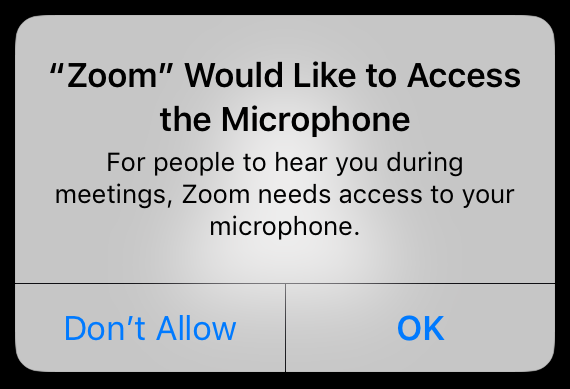
When this happens, you should feel free to deny the request unless you're sure you want it; you can always go back into your device's security settings later and change the setting if necessary. Some things, like microphone access for Zoom meetings, are clearly necessary. Others, like location data for a crossword game, are clearly not necessary. When in doubt, either deny the request or look for relevant documentation that explains why it might be necessary for your usage.
Security and convenience will always be at odds with each other. Your goal is to consciously decide between them instead of letting someone or something else make the choice for you.
Do One Thing
Pick one of the habits from the list above and choose an area of your digital life to apply it more consistently, or for the first time.
For instance, if you don't currently use a password manager, pick one and start using it, even if only on a trial basis. Or, if you currently reuse passwords on multiple accounts, choose some of the most important accounts (Gmail, banking, work, etc.) and change them to something new, strong, and unique.
Success comes through many small steps over time. A little progress each week will get you there!